









PLM Data Migration: Moving the Product’s “DNA” Without Breaking It
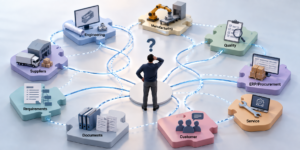
PLM data migration often looks simple and straight forward on project plans. Organizations approach PLM migration with a mindset of “We’re just moving parts, drawings, and BOMs from a old system to the new one.” However up close, it’s closer to a heart transplant. This is because, Product data is not a pile of files. It is a living network of relationships. A part is tied to revisions, those revisions are tied to change orders, the change orders are tied to ECO approvals, and many more. Break one link and the system might still load, but the business will feel it the next morning after go-live, when production can’t find the right spec or engineering can’t trust the BOM structure anymore.
We must treat PLM migration as a business continuity project, not just an IT “data load.”
Why PLM migration is different from just “moving data” and Reasons Why they fail?
While in most enterprise IT migrations we move transactional records, In PLM migrations we move meaning behind the data. For example, A CAD file migrated without its linked data context is just geometry, a drawing without the correct released revision is a liability and a part number with three duplicate “almost-the-same” records is the beginning of a long debugging week.
PLM migrations fail more often in the “in-between” processes than in the export/import mechanics.
Data quality is the obvious one. Missing attributes values, inconsistent units, free-text fields used as structured data, attachments stored in shared drives, and data duplicates created over years of workarounds lead to chaos.
Configuration management is also a quiet killer. If engineers belonging to different sites, departments, or even suppliers had used different processes or even different tool versions, we can end up with data that technically exists but cannot reliably combine into a single digital product definition required for PLM data migration.
Integrations are another trap. PLM rarely lives alone. If ERP expects a part classification that PLM doesn’t enforce, or if manufacturing planning depends on a BOM view that changes during data migration, we may “successfully migrate data” and still break the business.
And then there’s also the human factor. If business users don’t trust the new system on day one, they will create parallel spreadsheets on day two. If they create parallel spreadsheets, the new PLM system end up becoming a very expensive document store.
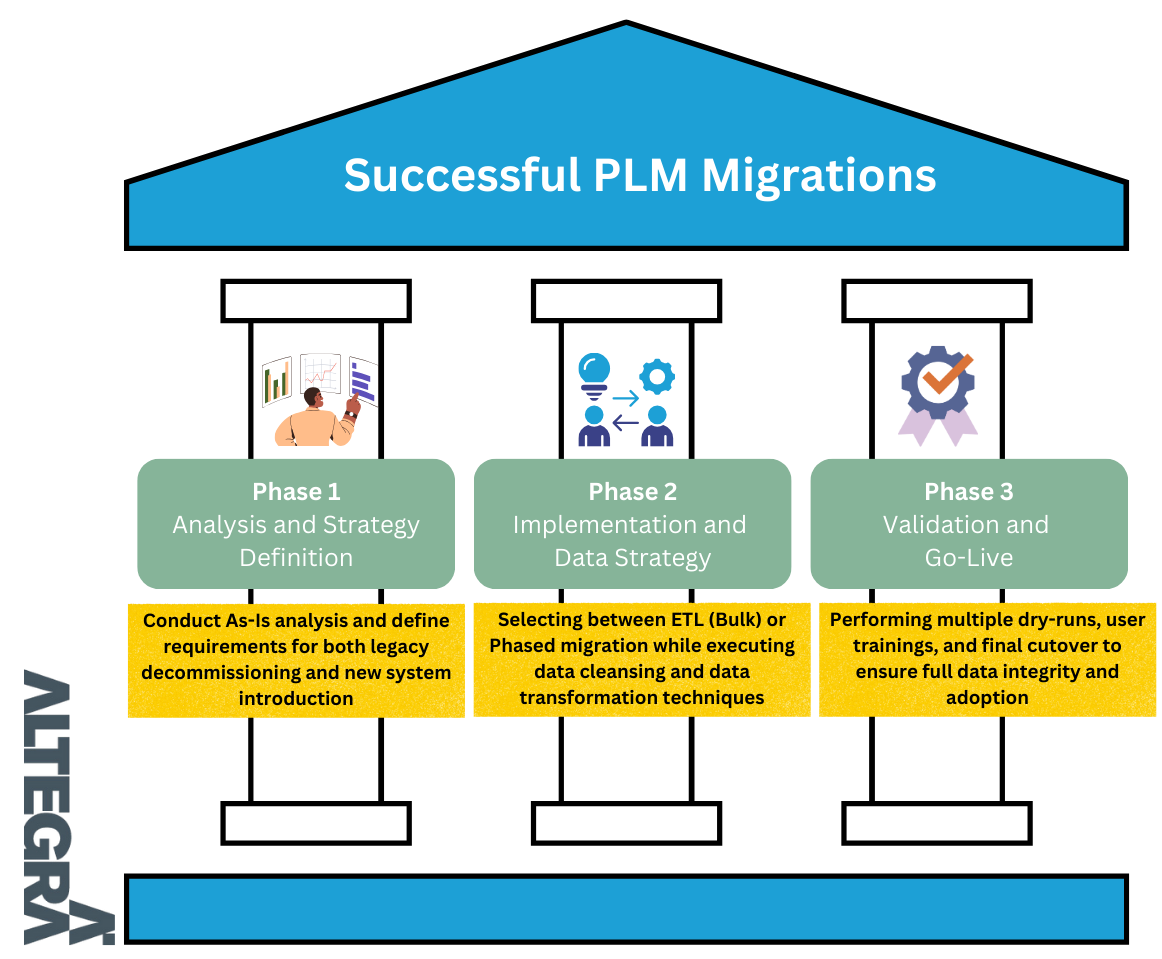
How Organizations can handle successful PLM data migration
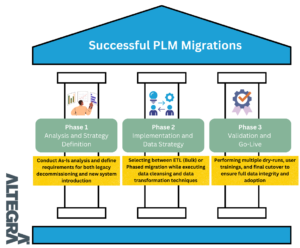
Most successful PLM data migrations follow the same backbone, even if the tools and acronyms differ.
- Honest Discovery: First, is to do discovery that is honest. Just counting objects is not efficient. Migration teams can research along with Business what the data is used for today, what must work on day one, and what can be archived. This is where migrations teams decide whether to migrate “everything” (usually a trap) or to migrate what is active and accessible, while keeping older history searchable through a read-only archive.
- Target Definition: Second is to define the target model like it will be tested in court. That means agreeing on naming rules, revision schemes, lifecycle states, units of measure, effectivity, access control, and the “source of truth” boundaries between PLM and ERP/MES. If the target rules are fuzzy, the migration will faithfully reproduce fuzziness, only difference is that fuzziness is now with a new UI. (Shit In – Shit Out)
- Smart Mapping: Third, is to build mapping and transformation with a bias toward automation, but with human sign-off. Automated mapping can move huge volumes, but humans still need to decide what “Part Type = Purchased” means in the new world, or what happens to parts created by a department that no longer exists.
- Repeated Rehearsals: Fourth, is to run trial migrations, not once but repeatedly. The first run is usually a learning exercise. The second run is where the real bugs show up. The later runs are about performance, reconciliation, and proving that downstream processes work.
- Controlled Cutover: Finally, treat cutover as a controlled operation. Migration teams must plan the freeze window, the delta migration (everything that changed since the last rehearsal), validation checks, and a rollback plan. If rollback is impossible, must compensate with deeper rehearsals and stronger validation gates.
How Can We Measure Successful Data Migrations?
PLM migration is not a data plumbing job. It’s a trust-building job. When migrations fail, it’s usually because the organization tried to move the data without migrating the discipline that makes the data meaningful.
Decide what “success” means in business terms
Teams often measure data migration success by how many records are loaded. That’s a weak measure. The first and most practical measure is business continuity. On day one, can engineering find the right released CAD and drawing, open the correct BOM, and understand what is valid for a given product and plant? If end users spend their first week asking, “Which one is correct?” then the migration may be technically complete but operationally failing.
Data correctness at the relationship level
A good measurement approach related to Data correctness is to check whether the relationship links still behave correctly when users search, revise, release, and route changes. If relationships are broken, it results in wrong assemblies, missing attachments, or approvals that no longer reflect reality.
Measuring Reconciliation and Traceability
Another strong measure is reconciliation and traceability. Ability to prove where migrated data came from, how it was transformed, and why it looks the way it does in the target. This is especially important for regulated industries. If the transformation rule cant be explained, or a released record cant be traced back to its source, the organization will hesitate to trust the new system.
Finally Measuring User Trust
User trust is a metric often ignored because it feels “soft,” but it shows up in hard costs. If users keep exporting lists, rebuilding BOMs in Excel, or creating duplicate parts because they don’t trust search results, then the migration has not landed. A simple way to measure this is to monitor the first few weeks after go-live like looking for support tickets mainly “how do I use it,” or are they “data is wrong, “I can’t find the right revision”, “I see a structure mismatch for this BOM”? The later categories re warning sign.
The new PLM must become the place where end users naturally go to make decisions. If they stop double-checking everything in the old system, stop maintaining side trackers, and stop arguing about which data is “real,” that’s when the migration has worked.
The best PLM migrations always result is silence with no panic and no workarounds

My focus is on helping organizations optimize their product lifecycle processes, enhance collaboration, and achieve sustainable growth through effective PLM strategies. Dedicated to delivering value, I strive to empower clients to overcome challenges and achieve their business goals.